Showing posts with label Scripting. Show all posts

Tuesday, March 14, 2023

Useful linux commands


export TZ=Asia/Tokyo  # to set timezone for single terminal  [Click]

Wednesday, November 10, 2021

Bit-bucket pull request conflict resolve

 #1. resolving the conflict in bit bucket pull request

git checkout commit-id

eg:

$git branch -a

* (HEAD detached from eb9e6ce)

  master

  test

  remotes/origin/HEAD -> origin/master

  remotes/origin/master

  remotes/origin/test


#2. merge the changes from master to the detached HEAD,so both changes will be there if conflict

git merge remotes/origin/master

HEAD>>>>

<<<<<<


#3. resolve the conflit and commit it ....

git add files

git commit -m "conflict resolved" # status shows (HEAD -> test)


#4. Pushing the commit to the remote and switch to the target branch and pull

git push origin HEAD:refs/heads/test

git checkout <branch-name>

git pull #status shows conflict fixed (HEAD -> test, origin/test)


#5. In bit bucket the master changes will be sync to the test branch
Saturday, January 11, 2020

Network performance tunning

Network performance tunning

Good Topic:
 Ref: https://blog.cloudflare.com/how-to-receive-a-million-packets/

HW Spec: They both have two 6-core 2GHz Xeon processors. With hyperthreading (HT) enabled that counts to 24 processors on each box. The boxes have a multi-queue 10G network card by Solarflare, with 11 receive queues configured. More on that later. 

Crash course to multi-queue NICs:
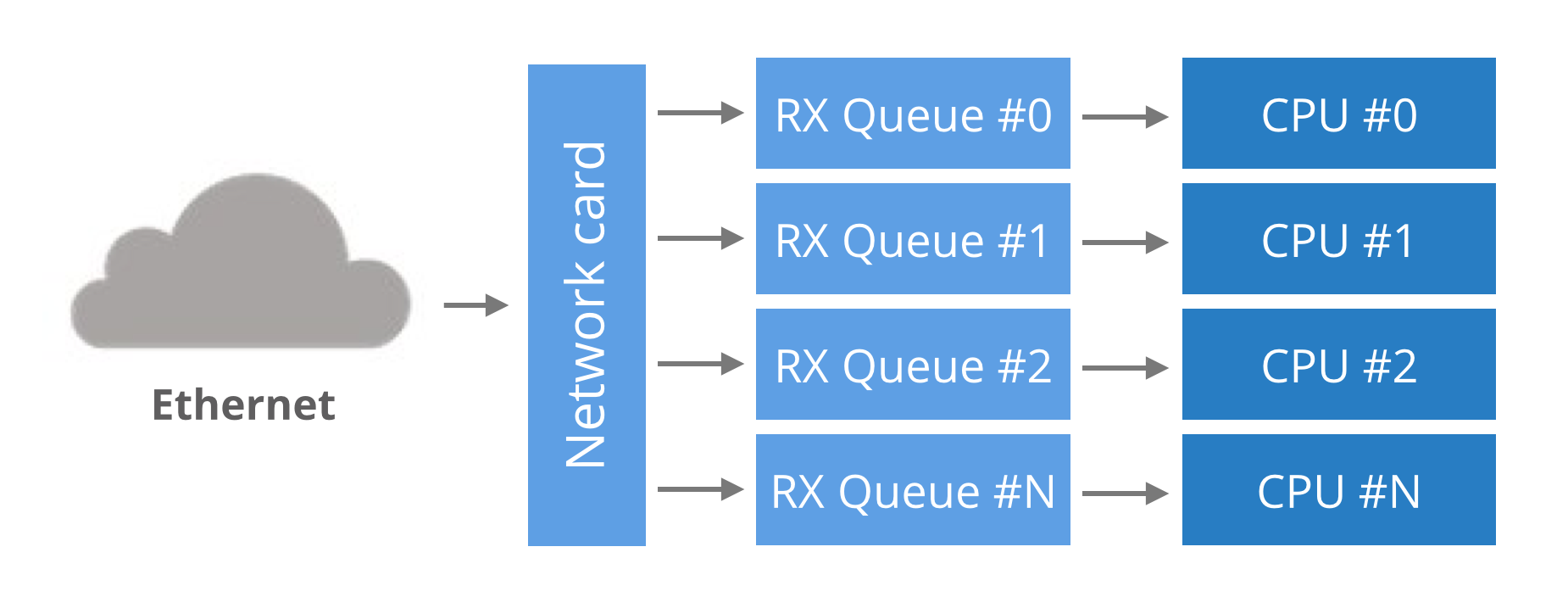
Historically, network cards had a single RX queue that was used to pass packets between hardware and kernel. This design had an obvious limitation - it was impossible to deliver more packets than a single CPU could handle.
To utilize multicore systems, NICs began to support multiple RX queues. The design is simple: each RX queue is pinned to a separate CPU, therefore, by delivering packets to all the RX queues a NIC can utilize all CPUs. But it raises a question: given a packet, how does the NIC decide to which RX queue to push it?
multiqueue nic
Round-robin balancing is not acceptable, as it might introduce reordering of packets within a single connection. An alternative is to use a hash from packet to decide the RX queue number. The hash is usually counted from a tuple (src IP, dst IP, src port, dst port). This guarantees that packets for a single flow will always end up on exactly the same RX queue, and reordering of packets within a single flow can't happen.
In our case, the hash could have been used like this:
RX_queue_number = hash('192.168.254.30', '192.168.254.1', 65400, 4321) % number_of_queues

Multi-queue hashing algorithms

The hash algorithm is configurable with ethtool. On our setup it is:
receiver$ ethtool -n eth2 rx-flow-hash udp4
UDP over IPV4 flows use these fields for computing Hash flow key:
IP SA
IP DA
This reads as: for IPv4 UDP packets, the NIC will hash (src IP, dst IP) addresses. i.e.:
RX_queue_number = hash('192.168.254.30', '192.168.254.1') % number_of_queues
This is pretty limited, as it ignores the port numbers. Many NICs allow customization of the hash. Again, using ethtool we can select the tuple (src IP, dst IP, src port, dst port) for hashing:
receiver$ ethtool -N eth2 rx-flow-hash udp4 sdfn
Cannot change RX network flow hashing options: Operation not supported
Unfortunately our NIC doesn't support it - we are constrained to (src IP, dst IP) hashing.
TIPS:(1) While we could have used the usual send syscall, it wouldn't be efficient. Context switches to the kernel have a cost and it is be better to avoid it. Fortunately a handy syscall was recently added to Linux: sendmmsg. It allows us to send many packets in one go.
TIPS:(2) Fortunately, there is a workaround recently added to Linux: the SO_REUSEPORT flag. When this flag is set on a socket descriptor, Linux will allow many processes to bind to the same port. In fact, any number of processes will be allowed to bind and the load will be spread across them.
With SO_REUSEPORT each of the processes will have a separate socket descriptor. Therefore each will own a dedicated UDP receive buffer. This avoids the contention issues previously encountered:
receiver$ taskset -c 1,2,3,4 ./udpreceiver1 0.0.0.0:4321 4 1
  1.114M pps  34.007MiB / 285.271Mb
  1.147M pps  34.990MiB / 293.518Mb
  1.126M pps  34.374MiB / 288.354Mb

This is more like it! The throughput is decent now!
More investigation will reveal further room for improvement. Even though we started four receiving threads, the load is not being spread evenly across them:
port uneven
Two threads received all the work and the other two got no packets at all. This is caused by a hashing collision, but this time it is at the SO_REUSEPORT layer.
-----------------------------------------------------------------------------------
== My Observation ==
Below shows how to check NIC is has how many RX-TX queues
[root@localhost ~]# cat /proc/interrupts | grep ens192
  57:   14481874    8881296     446331    2463896   PCI-MSI-edge      ens192-rxtx-0
  58:   11724321    5151965     722736    6279171   PCI-MSI-edge      ens192-rxtx-1
  59:       1339    4112623          0 1338260993   PCI-MSI-edge      ens192-rxtx-2
  60:  411242882  920999779          0    3695065   PCI-MSI-edge      ens192-rxtx-3
  61:          0          0          0          0   PCI-MSI-edge      ens192-event-4
[root@localhost ~]# 


(or) run below to show rx and tx queues
[root@localhost ~]# ls /sys/class/net/ens192/queues/
rx-0  rx-1  rx-2  rx-3  tx-0  tx-1  tx-2  tx-3
[root@localhost ~]# 
[ref]: You can see how many queues that you have available with: ethtool -S [interface]
If you have multiple queues enabled, they will show up. In addition you can watch traffic on the rx (tx) queues with the watch command:
watch -d -n 2 "ethool -S [interface] | grep rx | grep packets | column"
For Filtering Queues, use: tc qdisc show dev [interface]
If you have ADq or DCB queues they will show up here.
The documentation at https://www.kernel.org/doc/Documentation/networking/multiqueue.txt has a number of useful concepts and uses the tc command to manipulate the available multiqueue parameters. Without knowing your intentions, it's difficult to give a specific answer, but this information should get you pointed in the right direction.
-------------------------------------------------------------------------------------------------------------
TIPS:(3) RSS - Receive Side Scaling

In the previous article we mentioned that the NIC hashes packets in order to spread the load across many RX queues. This technique is called RSS - Receive Side Scaling. We can see it in action by observing the /proc/net/softnet_stat file with the softnet.sh script:
---------------------------------------------------------------------------------------------------------------


Monday, October 26, 2015

vimdiff tool usage notes

vimdiff Keyboard Shortcuts:

do - Get changes from other window into the current window.

dp - Put the changes from current window into the other window.

]c - Jump to the next change.

[c - Jump to the previous change.

Ctrl W + Ctrl W - Switch to the other split window.

:qa to quit all
:qa! to quit all without saving
:wqa save and quit all

Note: 
  • If you load up two files in splits (:vs or :sp), you can do :diffthis on each window and achieve a diff of files that were already loaded in buffers
  • :diffoff can be used to turn off the diff mode. 

Link: http://amjith.blogspot.in/2008/08/quick-and-dirty-vimdiff-tutorial.html  

Sunday, October 25, 2015

Google Repo command


Google Repo Command tips:

Intro: The Google repo command used to manage multiple git repository under single umberlla.


To list status for all git repo
repo forall -c 'git status'

To lists status for all with repo name git repository under manifest
repo forall -c 'pwd; git status'
repo forall -c 'pwd; git status -s| cut -c4- '

To pull all the repo changes
repo forall -c 'git reset --hard'
repo forall -c 'git clean -fd'
repo sync && repo start --all


Friday, October 16, 2015

Git commands


Basics:
========
To add files to be committed      
  git add 
To commit a change in the local tree. To be done after the git add.
  git commit -m "comment about the changes"
To push the changes or checkin the changes to main branch    
  git push
To discard all changes done in a branch locally
  git stash save --keep-index
  git stash drop
    
To create a new branch     
  git checkout -b myBranch
 
To create a patch from the local branch
 Before this check out a new branch, do all changes in the branch, verify it. And then commit those changes. Do not push the changes to master.
 git format-patch master --stdout > myPatch.patch

git reset  updates the index for that path so that it matches HEAD (the current commit). 
It doesn't touch the working tree

git rm --cached -r  to remove a directory which was added.
 
GT Diff:
==========
git diff HEAD@{1}
The @{1} means "the previous position of the ref I've specified", so that
evaluates to what you had checked out previously - just before the pull.

git diff HEAD@{1} filename
This is a general thing - if you want to know about the state of a file
in a given commit, you specify the commit and the file, not an ID/hash
specific to the file.

git diff --cached --name-only   
It lists the filenames in the staging area that will be committed to git. Can be used after all the files to be committed are added thru 'git add'  to verify only intended files are being commited

git difftool --cached
the diff of files that are about to be committed against the head will be showed in vimdiff one by one.

git difftool  
the diff of files in the two commits will be shown in vimdiff one by one.

git log --pretty=oneline
compact display of git log

how about 
  • git diff --name-only for changes relative to index
  • git diff --name-only --staged for ... well staged chages :)
  • git diff --name-only HEAD got both
To get the modified files alone:
git status --porcelain|awk '{if($1=="M") {print "basename " $2}}'|sh

To copy the modified files alone to a remote server, as below:
git status --porcelain|awk '{if($1=="M") {print "scp " $2 " account_name@server_ip:~/my_codebase/$(dirname " $2 ")/;"} }'|sh


Global GIT Configuration: ~/.gitconfig

#vi ~/.gitconfig
[alias]
    st = status
    ci = commit
    br = branch
    co = checkout
    df = diff
    dc = diff --cached
    lg = log -p
    who = shortlog -s --
    changes=diff --name-status -r
    diffstat=diff --stat -r
    logtree = log --pretty=format:\"%h %ad | %s%d [%an]\" --graph --date=short
    last = log -1 HEAD
    tree = log --graph --decorate --pretty=oneline --abbrev-commit
     # format %cd with --date=short cuts the timezone in log 
    ll = log --graph --pretty=format:\"%C(yellow)%h %C(green)(%cd)%C(auto)%d %Creset%s [%an]\" --date=short
    logtree = log --pretty=format:\"%h %ad | %s%d [%an]\" --graph --date=short
 
[user]
        email = emailid@email.com
        name = Name S
[color]
        ui = auto
[diff]
        tool = vimdiff


# run
git config --global diff.tool vimdiff  #to defibe difftool
git difftool    # launch vimdiff with changes

This will add alias "tree"
git config --global alias.tree "log --graph --decorate --pretty=oneline --abbrev-commit"

For external file diff usage
[diff]
    external = /bin/git-meld.sh


$ cat /home/<dir>/bin/git-meld.sh
#!/bin/bash

meld $2 $5


vi editor ~/.vimrc


" Run time config for vim editor
set cindent    " for c indentation(correct spacing)
syntax on    "To color the VIM editor
set nu ” line numbers
set ts=4 " –> for tab spaces set to four per tab character
set sw=4 "–> Set the shift width to four spaces
set spell " –> set spellchecking on
 set spl=en "–> Set spelling language to english
set ai "–> Enable auto indentation
set nu "–> Enables line numbers
" To remember last position of open file
if has("autocmd")
  " When editing a file, always jump to the last known cursor position.
  " Don't do it when the position is invalid or when inside an event handler
  " (happens when dropping a file on gvim).
  " Also don't do it when the mark is in the first line, that is the default
  " position when opening a file.
  autocmd BufReadPost *
    \ if line("'\"") > 1 && line("'\"") <= line("$") |
    \   exe "normal! g`\"" |
    \ endif

endif

Monday, November 18, 2013

How to make the tmp file system volatile


mount -t tmpfs -o size=65536 tmpfs /tmp
With size restricted /tmp dir created .
 For this you need enable temp file system in Linux kernel.

 mount -t tmpfs -o size=$((192 * 1024)) tmpfs /var

 For example in nfs create a temporary fs to hold core files alone:

 #update the core file pattern
echo "/var/core/core.%e.%p" > /proc/sys/kernel/core_pattern
mkdir -p /var/core
mount -t tmpfs -o size=$((32 * 1024)) tmpfs /var/core

Sunday, December 4, 2011

Look at a String literals


#include <stdio.h>
#include <string.h>
char *ap1="char *ap1";
static char *ap2="static char *ap2";
int ii;
main()
{
int i;
char a[] ="char a[]";
char a1[] ="char a1[]";
static char a2[32] ="static char a2[10] ";
const char a3[32] ="const char a3[10] ";
char *ap ="char *ap";
static char *aptr ="static *aptr";

printf("strlen a[] %d \n",strlen(a));
printf("sizeof a[] %d \n",sizeof(a));
printf("a[sizeof] %d \n",a[strlen(a)]);

char help[20]="a b c d e ";

printf("local:\n&i %p %d \n",&i,i);
printf("a1 %p %s \n",a1,a1);
printf("a2 %p %s \n",a2,a2);
printf("a3 %p %s \n",a3,a3);
printf("*ap %p %s \n",ap,ap);
printf("*aptr %p %s \n",aptr,aptr);
printf("global:\n*ap1 %p %s \n",ap1,ap1);
printf("*ap2 %p %s \n",ap2,ap2);
printf("&ii %p %s \n",&ii,ii);

}

[output]: ./a.out

strlen a[] 8
sizeof a[] 9
a[sizeof] 0
local:
&i 0xbff103f8 -1074723816 < stack
a1 0xbff103e5 char a1[]
a2 0x8049940 static char a2[10]
a3 0xbff103c5 const char a3[10]
*ap 0x80486d8 char *ap
*aptr 0x80486cb static *aptr
global:
*ap1 0x80486b0 char *ap1
*ap2 0x80486ba static char *ap2
&ii 0x8049968 (null)

NULL in stdio is ((void*)0)

Tuesday, November 29, 2011

Quick Makefile


CC=gcc
S = file1.c file2.c

O = $(S:%.c=%.o)


exe: ${O}
     $(CC) ${LIBS} -o $<


# pull in dependency info for *existing* .o files
-include $(OBJS:.o=.d)

%.o: %.c 

 $(CC) ${INCLUDES} $(CFLAGS) -MMD -o $@ -c $<
 gcc -MM $(CFLAGS) $*.c > $*.d


.PHONY clean
clean:
     \rm -rf *.o exe


Note: Green highlighted stuff optional or use -MMD, are used to create dependencies

Another Example:
--------------------
ERR = $(error found an error!)
.PHONY: err

err: ; $(ERR)

Thursday, October 27, 2011

Vi Tips - QuickFix


See
:help :compiler
:help :make

(the latter without a preceding exclamation mark) which will
automagically display the first error (if any) as soon as the make job
terminates. (Not sure if you'll get to the first _warning_ or _error_),
and a few other useful commands for use after that:

:cfir[st]
:cla[st]
:cn[ext]
:cp[revious]
:cnf[ile]
:cpf[ile]

for navigating the error list, and

:cope[n]
:ccl[ose]

to see it in its own window (the "quickfix" window), where hitting Enter
on an error moves to that line in the source. Of course, these commands
can be mapped for ease of use; for instance I have the following in my
vimrc:

:map :cnext
:map :cprev

which I use not so much for compiling but for the ":helpgrep" and
":vimgrep" commands (whose results also come in a quickfix window).

See also ":help quickfix.txt"


====================Vimdiff ==================
# vimdiff
Most of what you asked for is folding: vim user manual chapter on folding. Outside of diffs I sometime use:
   * zo -> open fold.
   * zc -> close fold.
But you wll probably be better served by:
   * zr -> reducing folding level.
   * zm -> one more folding level, please.
or even:

   * zR -> Reduce completely the folding, I said!.
   * zM -> fold Most!.
   
]c - Jump to the next change.
[c - Jump to the previous change.
:diffupdate :diffu -> recalculate the diff,

Thursday, July 7, 2011

Step to extract a specific file from tar ball

1) zcat compressed.tar.Z | tar xvf - file1 file2
2) cat compressed.tar | tar xvf - file1 file2
3) tar -xf filename.tar file1 file2

Tuesday, November 23, 2010

Auto Login using expect script


#!/bin/expect -f
# Parse argument Variables
set user [lrange $argv 0 0]
set ipaddress [lrange $argv 1 1]

spawn ssh -l user ipaddress
match_max 100000
# Look for passwod prompt
set timeout 2
expect "*(yes/no)?" {
send "yes\r"
}
expect "*?assword:*"
send "password\r"
interact
expect eof


---End---

./test user 192.1.1.1

Enablling traces in Bash script


#!/bin/bash

# require that all variables be set, otherwise the bash script will abort
set -o nounset

# pltTrace=2 # uncomment pltTrace to enable trace

export nodeType=""
export BaseProgName=`basename $0`
export ProgName=${BaseProgName}.$$

# if pltTrace is not already defined, define it
# this will allow individual programs to be
# debugged without turning on debugging for
# all scritps that source this file
if ! [ ${pltTrace:+1} ]
then
declare -x pltTrace=0
#change pltTrace to 1 to turn on debug for
# all scripts that haven't defined pltTrace
fi

if [ $pltTrace -ge 2 ]
then
PS4='${ProgName}:$LINENO: pltTrace-> '
set -o xtrace
fi

echo `date '+%Y%m%d.%H%M.%S'` ${BaseProgName} ": ENTER: Echoing here ..."

echo hello
if [ ! : ]; then
echo hello 2
fi
echo hello 3

---END---
Execute:
export pltTrace=2
./test

ttest.16898:37: pltTrace-> date +%Y%m%d.%H%M.%S
test.16898:37: pltTrace-> echo 20101124.0558.51 test ': ENTER: creating ZFS pools and files systems ... starting'
20101124.0558.51 test : ENTER: creating ZFS pools and files systems ... starting
test.16898:40: pltTrace-> echo hello
hello
test.16898:42: pltTrace-> '[' '!' : ']'
test.16898:47: pltTrace-> echo hello 3
hello 3

Tuesday, November 11, 2008

Windows CMD prompt profile for Linux users

rem Set PATH to current working directory

mkdir profile
rem --- create ls command ---
echo @echo off > profile/ls.bat
echo dir >> profile/ls.bat
rem --- create pwd command ---
echo @echo off > profile/pwd.bat
echo cd >> profile/pwd.bat

Wednesday, October 22, 2008

Makefile Tips and Tricks - GNU Make


http://www.gnu.org/software/make/manual/make.html


Index of Concepts


append '-' before command to ignore error in makefile and
--silent with make or '@' before every command to echo off
eg:
  -rm foo
  -include Makefile_vars inc.mk
  @echo " Only once printed ";

Implicit variables
MAKELEVEL - Gives level of the make recursive subdir entries


Appendix A Quick Reference


Function Call Syntax

A function call resembles a variable reference.
It looks like this:
$(function arguments)
or like this:
${function arguments}


Functions for Transforming Text


1.Test Functions for String Substitution and Analysis

$(subst from,to,text)
$(patsubst pattern,replacement,text)
$(strip string)
.........and so on
example : override CFLAGS += $(patsubst %,-I%,$(subst :, ,$(VPATH)))

2. So on.. Please click link for further details


.PHONY Target


Automatic Variables

$< $@ $? $*


Defining and Redefining Pattern Rules

Here are some examples of pattern rules actually predefined in make. First, the rule that compiles `.c' files into `.o' files:

%.o : %.c
        $(CC) -c $(CFLAGS) $(CPPFLAGS) $< -o $@

defines a rule that can make any file x.o from x.c. The command uses the automatic variables `$@' and `$<' to substitute the names of the target file and the source file in each case where the rule applies (see Automatic Variables).

Bash Script Tips

http://www.hsrl.rutgers.edu/ug/shell_help.html

Command line arguments to shell scripts are positional variables:
$0, $1, ... - The command and arguments.
   With $0 the command and the rest the arguments.

$# - The number of arguments.
$*, $@ - All the arguments as a blank separated string.
  Watch out for "$*" vs. "$@".
  And, some commands: shift

$$ - Current process id.
$? - The exit status of the last command. and return result of last function

Conditional Reference
${variable-word} - If the variable has been set, use it's value, else use word.

POSTSCRIPT=first;
echo POSTSCRIPT
POSTSCRIPT=${POSTSCRIPT-second};
export POSTSCRIPT
echo POSTSCRIPT

${variable:-word} - If the variable has been set and is not null, use it's value, else use word.

These are useful constructions for honoring the user environment.
Ie. the user of the script can override variable assignments. Cf. programs like lpr(1) honor the PRINTER environment variable, you can do the same trick with your shell scripts.

${variable:?word} -If variable is set use it's value, else print out word and exit. Useful for bailing out.

String concatenation
The braces are required for concatenation constructs.
$p_01 - The value of the variable "p_01".
${p}_01 - The value of the variable "p" with "_01" pasted onto the end.

Include configuration
. command

This runs the shell script from within the current shell script. For example:
# Read in configuration information
. /etc/hostconfig

Debugging
The shell has a number of flags that make debugging easier:
sh -n command -

Read the shell script but don't execute the commands. IE. check syntax.
sh -x command
Display commands and arguments as they're executed. In a lot of my shell scripts you'll see
# Uncomment the next line for testing
# set -x

Makefile Options

http://www.hsrl.rutgers.edu/ug/make_help.html

dependecy1: dependencyA dependencyB ... dependencyN
[tab] command for dependency1

That is probably one of the simplest makefiles that could be made. When you type make, it automatically knows you want to compile the 'myprogram' dependency (because it is the first dependency it found in the makefile). It then looks at mainprog.cc and sees when the last time you changed it, if it has been updated since last you typed 'make' then it will run the 'gcc mainprog.cc ..." line. If not, then it will look at myclass.cc, if it has been edited then it will execute the 'gcc mainprog.cc ..." line, otherwise it will not do anything for this rule.

Before issuing any command in a target rule set there are certain special macros predefined.

1. $@ is the name of the file to be made.
2. $? is the names of the changed dependents.

So, for example, we could use a rule

printenv: printenv.c
[tab] $(CC) $(CFLAGS) $? $(LDFLAGS) -o $@

alternatively:

printenv: printenv.c
[tab] $(CC) $(CFLAGS) $@.c $(LDFLAGS) -o $@

There are two more special macros used in implicit rules. They are:

3. $< the name of the related file that caused the action.
4. $* the prefix shared by target and dependent files.

Example Target Rules
INC=../misc
OTHERS=../misc/lib.a

$(OTHERS):
[tab] cd $(INC); make lib.a

Beware:, the following will not work (but you'd think it should)

INC=../misc
OTHERS=../misc/lib.a

$(OTHERS):
[tab] cd $(INC)
[tab] make lib.a

Each command in the target rule is executed in a separate shell. This makes for some interesting constructs and long continuation lines.

Tuesday, October 21, 2008

GCC Options and GDB notes

gcc example.c [options]

-S - Compiles and stops. Output is assembler code (suffix .S).
-o [name] - Gives executable as 'name'.
-E - Preprocess source file only.
    Comments will be discared unless -C is also specified.
    Creates #line directives unless -P is also specified.
-M - The preprocessor outputs one make rule containing the object file name for that source file, a colon, and the names of all the included files,including those coming from -include or -imacros command line options.
-W - Print extra warning messages.
    -Wall print all warnings


Example:
cat > example.c << EOF
#include <stdio.h>
#include <string.h>

int main()
{
printf("Hello world");
}
EOF
#


GDB notes:

Compile C code with -g option and run 'gdb a.out'
In gdb prompt set the break point as 'break main' or any function.
To run 'run '
To watch the particular variable set 'watch ' and if the variable get modified then it will get notified
To see the local variables 'info local'
To proceed next line 'n or next'
list to display the source code